Questions to ask at the table
Match the question to the moment. At the table, guests can tell you about food and service while you can still fix it. At payment, they can rate the whole visit. After they've left, they can tell you whether they'd come back. Pick one question from the right list — asking all of them at once gets you fewer answers, not more.
- 'How was your meal?' — the default. Broad, neutral, and works on a 1–5 scale.
- 'How is your food so far?' — catches a cold dish or a wrong order while there's time to replace it.
- 'How was the wait for your food?' — separates kitchen speed from food quality.
- 'How would you rate the service today?' — separates front of house from the kitchen.
- 'Did everything arrive as you ordered it?' — yes/no. A 'no' is something staff can put right before the bill.
- 'Which dish did you enjoy most?' — multiple choice from tonight's menu. Useful when you're testing new dishes.
Questions to ask at payment
- 'How was your visit today?' — the whole-experience rating, and the one to connect to Google reviews.
- 'How likely are you to recommend us to a friend?' — the 0–10 NPS question. Better for tracking loyalty over months than for catching a single bad night.
- 'Was the bill what you expected?' — flags confusing specials, unclear prices, or service charges guests didn't notice.
- 'How clean was the restaurant?' — includes the restrooms, which guests notice more often than they mention.
- 'Did you feel welcome when you arrived?' — the host-stand experience, which is easy to overlook.
- 'What brought you in today?' — multiple choice: walking past, a recommendation, a search, a delivery app, a regular. Cheap marketing attribution.
Questions to ask after the visit
- 'How likely are you to come back?' — for an email to your reservation or loyalty list the day after.
- 'What's one thing we could do better?' — open text. Keep it optional and ask it after a rating, never on its own.
- 'How was your order when it arrived?' — for takeaway and delivery: temperature, packaging, accuracy.
- 'How easy was it to book a table?' — if you take reservations online or by phone.
- 'What would bring you back sooner?' — multiple choice: new dishes, a lunch menu, events, longer hours. Only ask if you'd act on the answer.
- 'Did anything go wrong that we should know about?' — yes/no with an optional comment. A private route for complaints.
The one question to put on a QR table tent
If you print one QR code, use 'How was your meal?' or 'How was your visit today?' on a 1–5 scale. It's short enough to read across the table, neutral, and broad enough that any real problem — food, service, wait, cleanliness — shows up in the score. A narrow question like 'How was the wait?' misses everything else.
Print the question itself on the tent, in large type, next to the code: 'How was your meal? Scan to rate — one tap, no app.' Guests are more willing to scan when they know what they're agreeing to. Place it where it's visible at the end of the meal: on the bill folder, on the receipt, or on a tent that stays on the table after the plates are cleared. Under the menu stand is where QR codes go to be ignored.
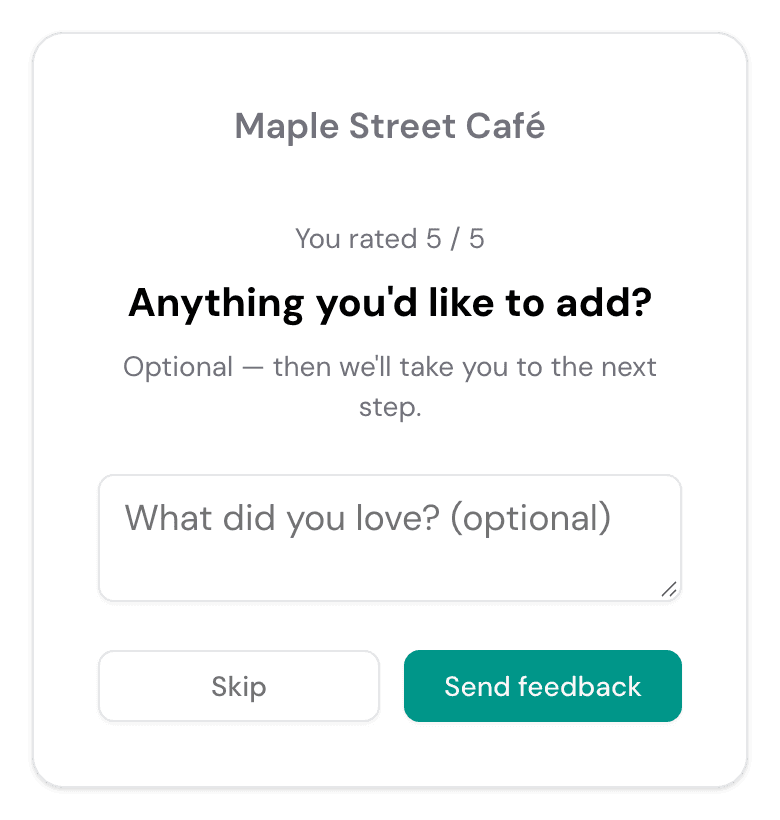
Keep any follow-up optional. After the rating, one comment box — 'Anything you'd like to tell us?' — is enough. Every extra required field costs you answers.
Ask every guest for a review, give complaints a private line
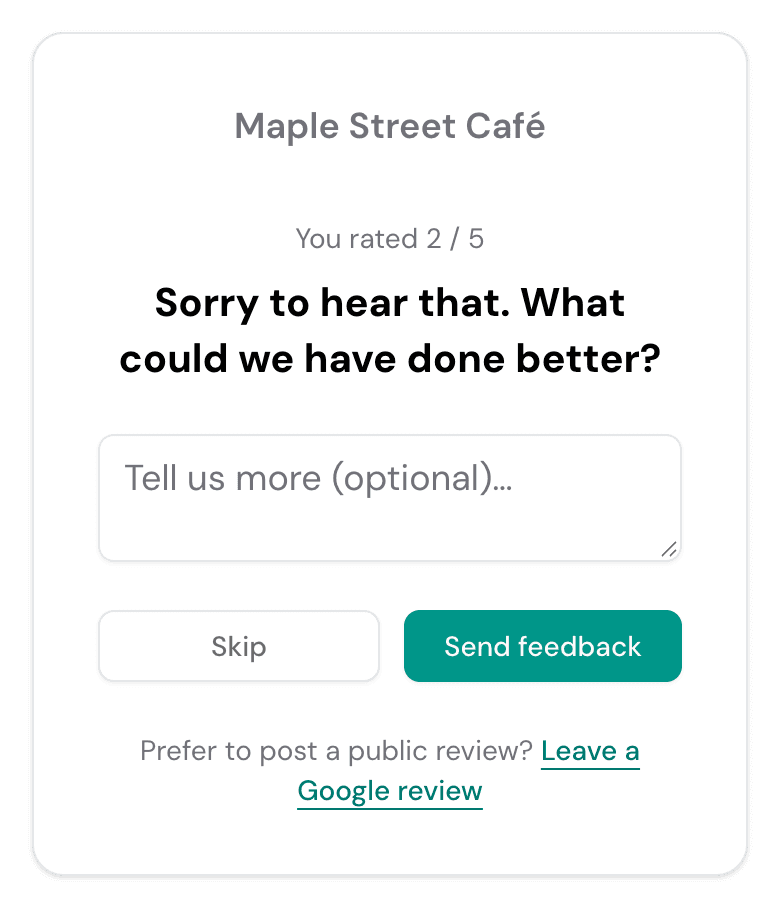
The most useful thing a rating can do is decide what happens next. With a Onetapvote Feedback Flow, every guest who scans sees the same 1–5 question. Guests who rate at or above your threshold — usually 4 — see a thank-you and a direct link to your Google review page. Guests who rate lower see a private 'What went wrong?' box that goes to the manager, with the Google review link still underneath.
This isn't about hiding bad reviews. Every guest is asked, every rating is recorded, and every guest can see the review link. Google's policies prohibit selectively asking only happy customers for reviews and discouraging negative ones, and the FTC's review rule bans suppressing them, so never hide your listing from anyone or ask guests not to post. Since April 2026 Google also bans pressuring guests to review while they are still on the premises and asking for reviews that name a staff member: let the table tent invite, never have staff push. The private box simply gives an unhappy guest a faster way to reach you than a public review.
A private complaint is only worth collecting if someone answers it. Make sure the manager on duty sees low ratings during the shift, and reply within a day to any complaint that came with contact details.
Show the data
| 2025 | 2026 | |
|---|---|---|
| Always read reviews before choosing a local business | 29% | 41% |
| Won't consider a business under 4.0 stars | 55% | 68% |
| Won't consider a business under 4.5 stars | 17% | 31% |
| Always leave a review when asked | 16% | 28% |
Source: BrightLocal Local Consumer Review Survey 2026 (n=1,002)
10 ideas for more Google reviews
Reviews are money for a restaurant. In Michael Luca's Harvard Business School study of Seattle restaurants, one more star on Yelp meant 5–9% more revenue for independent places; chains saw no effect. Most guests who are asked do write one: 83% in BrightLocal's 2026 survey. These ideas make sure every guest is asked, in a way Google allows.
| Finding | Effect | Study |
|---|---|---|
| One more Yelp star for an independent restaurant | +5–9% revenue | Michael Luca, Harvard Business School (Seattle, 2003–2009) |
| Rating goes up by 0.1 star | +25% conversion | Uberall, 64,000 locations (2019) |
| Guests who were asked for a review and wrote one | 83% | BrightLocal, 2026 |
A QR table tent with one question
"How was your meal?" in large type next to the code. It stays on the table after the plates are cleared.
TableFree10 min
A card in the bill folder
The moment the guest looks at the whole visit. A small card with the code and "Tell us how we did".
PaymentLow cost10 min
A sticker on takeaway bags
Delivery and takeaway guests never see the table tent. A sticker on the bag or box reaches them at home.
TakeawayLow cost1 hour
A short link on the receipt
A line such as yoursite.com/review printed at the bottom of every receipt, for guests who don't scan codes.
ReceiptFree15 min
An email after a reservation
The day after, one message with a one-tap rating to everyone who booked online. Every guest gets it, not only regulars.
EmailPaid tool30 min
One line when the check arrives
"If you'd like to tell us how we did, the code's on the tent." An invitation; never ask guests to name their server.
StaffFreePre-shift
A sticker on the door or window
For walk-ins and passers-by: "Been here? Tell us how we did" with the code, scanned on their own phone.
EntranceLow cost1 hour
A private question about a new dish
A separate code on the specials card: "How was the new risotto?" Answers stay private and tell the kitchen what to keep.
MenuFree10 min
Reply to every review within a day
81% of consumers expect a reply within a week, many by the next day. Thank the good ones by detail, answer the bad ones with a fix and a name.
Google profileFree10 min a day
A private line that the manager reads during the shift
Low ratings open a "What went wrong?" box, with the review link still shown. The manager on duty sees it while the guest is still there.
Rating flowPaid tool30 min
Your first 30 days
- 1
Week 1: print
Copy your Google review link, then print table tents and bill-folder cards with "How was your meal?" next to the code. Put a sticker on takeaway bags.
- 2
Week 2: brief the team
One line at the pre-shift briefing: mention the card when the check arrives, never push, never ask for a server's name. Add the rating link to your reservation follow-up email.
- 3
Week 3: reply to everything
Reply to every review from the last three months, then keep replying within a day. Make sure the manager on duty sees private low ratings during the shift.
- 4
Week 4: count and fix one thing
Count new reviews, the average rating and private complaints. Pick the most common complaint and change one thing. From now on, run the weekly routine below.
What to do with the answers every week
- 1
Check the trend
Compare this week's average rating and response count with the previous few weeks. One bad week is noise; three in a row is a pattern.
- 2
Read every low-score comment
They're the most specific feedback you'll get. Tag each one by theme — food, wait, service, cleanliness, price — and count the tags.
- 3
Slice by shift or location
If you print a different QR code per section, shift, or location, compare them. Problems tend to cluster: one shift, one station, one day of the week.
- 4
Pick one fix
Take the most common theme and change one thing. Changing five things at once makes it impossible to tell which one worked.
- 5
Tell the team
Share the rating trend and a few comments — good ones included — at the pre-shift briefing. Staff who see that feedback gets read take the QR code seriously.